Product MCP Server
Connect AI agents to TrigRun via the Model Context Protocol — create jobs, check executions, and manage secrets through tool calls.
TrigRun's MCP server lets AI agents manage request-based jobs, inspect executions, configure notifications, and handle secrets — all through natural language or direct tool calls.
It currently does not expose monitors or step-driven workflow/webhook-trigger job creation as MCP tools. Use the REST API for those flows.
Quick start
Step 1 — Get an API token
Log in to trigrun.com, open API Keys, and create a token. Copy the value right away because the full token is only shown once. It starts with cron_pat_, and you'll pass it as the token argument in every tool call.
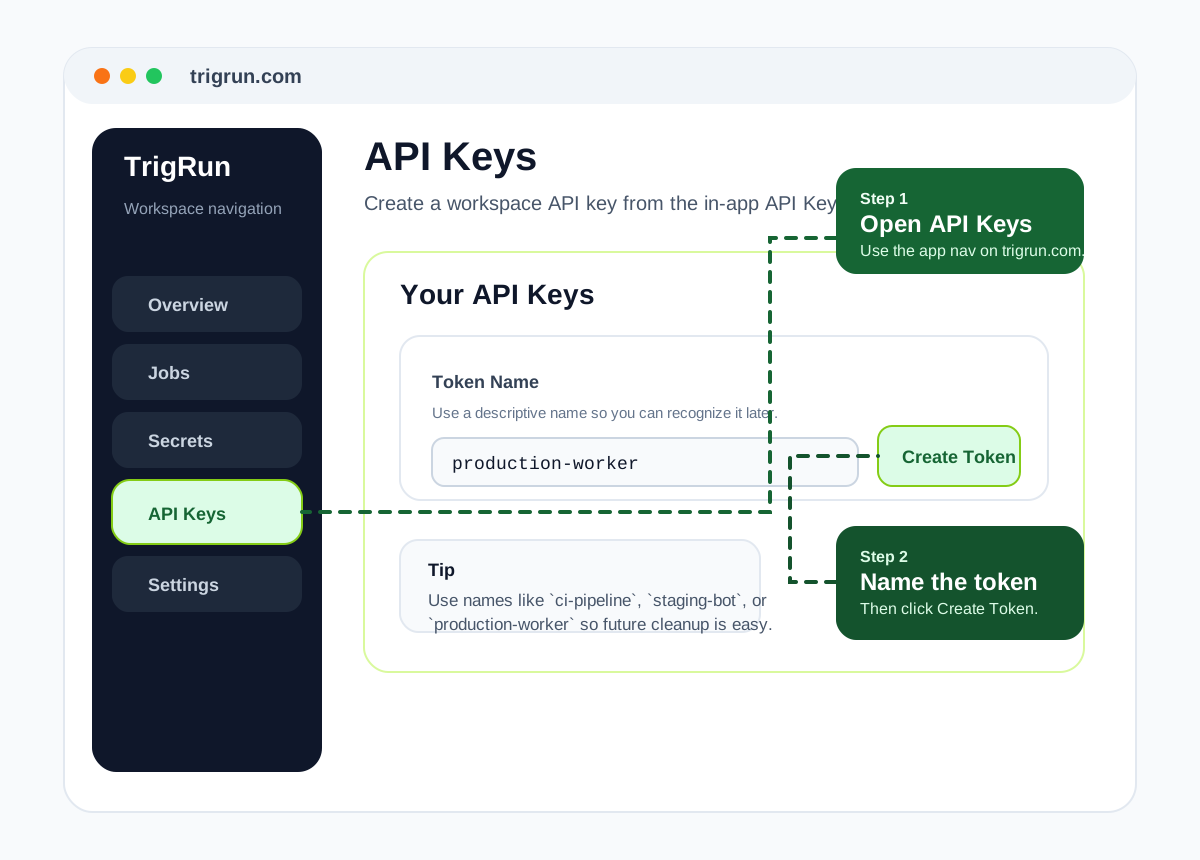
If you need a step-by-step walkthrough, see the Authentication guide.
Step 2 — Add the MCP server
TrigRun exposes a hosted Streamable HTTP MCP endpoint:
Point any Streamable HTTP MCP client at that URL.
Cursor or any remote Streamable HTTP client:
If your client asks for a transport, choose Streamable HTTP.
Step 3 — Verify it works
Ask your agent:
List my TrigRun jobs using token
cron_pat_your_token_here.
The agent will call list_jobs and show your existing jobs (or an empty list if you're new).
Authentication
Every tool requires a token argument. Use an API token for long-lived agent access:
You can also pass a short-lived JWT from POST /v1/auth/login if you prefer session-based auth.
Available tools
Jobs
list_jobs
List all scheduled jobs in your workspace. Optionally filter by state.
| Argument | Type | Required | Description |
|---|---|---|---|
token | string | Yes | API token or JWT |
state | string | No | Filter: active, paused, draft, or completed |
get_job
Get full details of a specific job by ID.
| Argument | Type | Required | Description |
|---|---|---|---|
token | string | Yes | API token or JWT |
job_id | string | Yes | Job ID |
create_job
Create a new scheduled HTTP job. Supports the request-based schedule kinds exposed by the CLI and dashboard, plus template_id for pre-filled defaults.
| Argument | Type | Required | Description |
|---|---|---|---|
token | string | Yes | API token or JWT |
name | string | No | Job name. Can be omitted when template_id supplies it. |
url | string | No | Target URL to call. Can be omitted when template_id supplies it. |
kind | string | No | one_time, cron, recurring, or scheduled (default one_time) |
method | string | No | HTTP method (default GET) |
cron | string | No | Cron expression — required when kind is cron |
every_n_minutes | number | No | Interval — required when kind is recurring |
headers | object | No | Key/value HTTP headers |
body | string | No | Request body string |
template_id | string | No | Template ID such as health-check-ping |
TrigRun evaluates cron expressions in UTC. Agents should convert local wall-clock schedules to UTC before creating jobs and should not send a timezone argument.
pause_job
Pause a running job. It will stop firing until resumed.
| Argument | Type | Required | Description |
|---|---|---|---|
token | string | Yes | API token or JWT |
job_id | string | Yes | Job ID |
resume_job
Resume a paused job. TrigRun recomputes the next run time from now.
| Argument | Type | Required | Description |
|---|---|---|---|
token | string | Yes | API token or JWT |
job_id | string | Yes | Job ID |
run_job
Trigger immediate execution of a job, regardless of its schedule.
| Argument | Type | Required | Description |
|---|---|---|---|
token | string | Yes | API token or JWT |
job_id | string | Yes | Job ID |
delete_job
Permanently delete a job and its execution history.
| Argument | Type | Required | Description |
|---|---|---|---|
token | string | Yes | API token or JWT |
job_id | string | Yes | Job ID |
Executions
list_executions
List executions. Optionally filter to a specific job.
| Argument | Type | Required | Description |
|---|---|---|---|
token | string | Yes | API token or JWT |
job_id | string | No | Filter to executions for this job |
get_execution
Get full details for an execution, including all retry attempts and the final response.
| Argument | Type | Required | Description |
|---|---|---|---|
token | string | Yes | API token or JWT |
execution_id | string | Yes | Execution ID |
replay_execution
Re-queue a specific execution. Useful for recovering failed runs without waiting for the next scheduled fire.
| Argument | Type | Required | Description |
|---|---|---|---|
token | string | Yes | API token or JWT |
execution_id | string | Yes | Execution ID |
Notification channels
list_channels
List all notification channels in your workspace.
| Argument | Type | Required | Description |
|---|---|---|---|
token | string | Yes | API token or JWT |
create_channel
Create a notification channel. Supported types: webhook, email, slack, discord.
| Argument | Type | Required | Description |
|---|---|---|---|
token | string | Yes | API token or JWT |
name | string | Yes | Channel name |
type | string | Yes | webhook, email, slack, or discord |
url | string | No | URL for webhook/slack/discord |
email | string | No | Email address for email channels |
secret | string | No | Signing secret for webhook channels |
delete_channel
Delete a notification channel.
| Argument | Type | Required | Description |
|---|---|---|---|
token | string | Yes | API token or JWT |
channel_id | string | Yes | Channel ID |
Notification rules
list_rules
List notification rules attached to a job.
| Argument | Type | Required | Description |
|---|---|---|---|
token | string | Yes | API token or JWT |
job_id | string | Yes | Job ID |
add_rule
Attach a notification channel to a job event.
| Argument | Type | Required | Description |
|---|---|---|---|
token | string | Yes | API token or JWT |
job_id | string | Yes | Job ID |
channel_id | string | Yes | Channel ID |
event | string | Yes | on_success, on_failure, or on_completion |
remove_rule
Remove a notification rule from a job.
| Argument | Type | Required | Description |
|---|---|---|---|
token | string | Yes | API token or JWT |
job_id | string | Yes | Job ID |
rule_id | string | Yes | Rule ID |
Secrets
list_secrets
List all secret names in your workspace. Values are never returned.
| Argument | Type | Required | Description |
|---|---|---|---|
token | string | Yes | API token or JWT |
create_secret
Store an encrypted secret. Reference it in job headers with {{secret.name}}.
| Argument | Type | Required | Description |
|---|---|---|---|
token | string | Yes | API token or JWT |
name | string | Yes | Secret name |
value | string | Yes | Secret value (encrypted at rest with AES-256-GCM) |
To use this secret in a job header:
delete_secret
Delete a secret permanently.
| Argument | Type | Required | Description |
|---|---|---|---|
token | string | Yes | API token or JWT |
secret_id | string | Yes | Secret ID |
Notification deliveries
list_deliveries
List notification deliveries. Optionally filter by status.
| Argument | Type | Required | Description |
|---|---|---|---|
token | string | Yes | API token or JWT |
status | string | No | Filter: sent, pending, or failed |
limit | number | No | Max results (default 20) |
retry_delivery
Retry a failed notification delivery.
| Argument | Type | Required | Description |
|---|---|---|---|
token | string | Yes | API token or JWT |
delivery_id | string | Yes | Delivery ID |
Common workflows
Create a cron job with failure alerts
This is the most common setup: a regularly scheduled job with a Slack alert when it fails.
-
Create a Slack channel:
"Create a Slack notification channel named 'cron-alerts' with webhook URL https://hooks.slack.com/... using token cron_pat_..."
-
Create the job:
"Create a cron job named 'daily-report' that POSTs to https://api.example.com/report every day at 8 AM UTC using token cron_pat_..."
-
Attach the alert:
"Add a notification rule to job JOB_ID: send to channel CHANNEL_ID on_failure using token cron_pat_..."
The agent calls create_channel, create_job, then add_rule in sequence.
Check execution status
After a job fires, inspect what happened:
-
List recent executions:
"List executions for job JOB_ID using token cron_pat_..."
-
Get details on a specific one:
"Get execution EXEC_ID using token cron_pat_..."
The response includes every retry attempt, HTTP status codes, latency, and the full response body.
-
If it failed, check why: The
get_executionresult showsattemptswithstatus,statusCode, andresponseBodyfor each attempt.
Replay a failed execution
When an execution failed due to a transient error (timeout, 503), replay it without waiting for the next scheduled run:
-
Find the failed execution:
"List executions for job JOB_ID using token cron_pat_..."
-
Replay it:
"Replay execution EXEC_ID using token cron_pat_..."
replay_executionre-queues the exact same request. TrigRun will apply the job's retry policy to the replay as well.
Store a secret and use it in a job
Avoid hardcoding API keys in job headers:
-
Store the secret:
"Create a secret named 'stripe-api-key' with value sk_live_... using token cron_pat_..."
-
Create the job referencing the secret:
"Create a job named 'process-payments' that POSTs to https://api.example.com/payments with header Authorization: Bearer
{{secret.stripe-api-key}}, using token cron_pat_..."The worker resolves
{{secret.stripe-api-key}}at execution time. The raw value is never stored in the job record.
Temporarily pause and resume a job
To disable a job without deleting it (e.g., during a maintenance window):
-
Pause:
"Pause job JOB_ID using token cron_pat_..."
-
Resume when ready:
"Resume job JOB_ID using token cron_pat_..."
Resuming recomputes the next run from the current time — it won't backfill missed fires.
Tool reference summary
| Tool | Category | What it does |
|---|---|---|
list_jobs | Jobs | List all jobs, filter by state |
get_job | Jobs | Get job details by ID |
create_job | Jobs | Create a scheduled HTTP job |
pause_job | Jobs | Pause a running job |
resume_job | Jobs | Resume a paused job |
run_job | Jobs | Trigger immediate execution |
delete_job | Jobs | Delete a job permanently |
list_executions | Executions | List executions, optionally for a job |
get_execution | Executions | Get execution details with all attempts |
replay_execution | Executions | Re-queue a specific execution |
list_channels | Notifications | List notification channels |
create_channel | Notifications | Create webhook/email/slack/discord channel |
delete_channel | Notifications | Delete a channel |
list_rules | Notifications | List rules for a job |
add_rule | Notifications | Attach channel to job event |
remove_rule | Notifications | Remove a notification rule |
list_secrets | Secrets | List secret names (values hidden) |
create_secret | Secrets | Store an encrypted secret |
delete_secret | Secrets | Delete a secret |
list_deliveries | Deliveries | List notification deliveries |
retry_delivery | Deliveries | Retry a failed delivery |