Authentication
How to authenticate with TrigRun — email verification, roles, API tokens, and workspace switching.
TrigRun supports two authentication methods. Both use the Authorization: Bearer <token> header.
Signup and email verification
New accounts may require email verification before you can create jobs, secrets, or other resources. When verification is enabled, signup returns 202 Accepted and the response includes email_verification_required: true.
Sign up:
Returns 201 Created when verification is auto-enabled, or 202 Accepted when verification is required:
When verification is required, check your inbox for a verification link and click it to activate your account. You can also resend the verification email:
Once verified, your trust_level changes to verified and write actions are unlocked.
JWT tokens (user sessions)
JWT tokens are issued on signup and login. They identify the user, workspace, and role, and expire after 7 days.
Log in:
Use the token in subsequent requests:
Workspace switching
If you belong to multiple workspaces, your token is scoped to the first workspace by default. Switch to a different workspace:
This returns a new JWT scoped to the target workspace.
List your workspaces:
Roles
Every workspace member has one of three roles:
| Role | What they can do |
|---|---|
| Owner | Everything. Billing, team management, API tokens, workspace settings, plus all admin actions. |
| Admin | Jobs, secrets, notification channels, execution replay. All operational actions. |
| Member | Read-only access. View jobs, executions, and settings but cannot create or modify resources. |
The workspace creator is automatically the owner. Ownership can be transferred via POST /v1/workspace/transfer.
API tokens (machine credentials)
API tokens are long-lived credentials scoped to a workspace. Use them for CI/CD pipelines, scripts, and integrations. Only workspace owners can create and manage tokens.
API tokens start with cron_pat_ and don't expire (until revoked). They inherit the role of the user who created them — if the creator is later removed from the workspace or restricted, the token stops working.
Create a token in the app
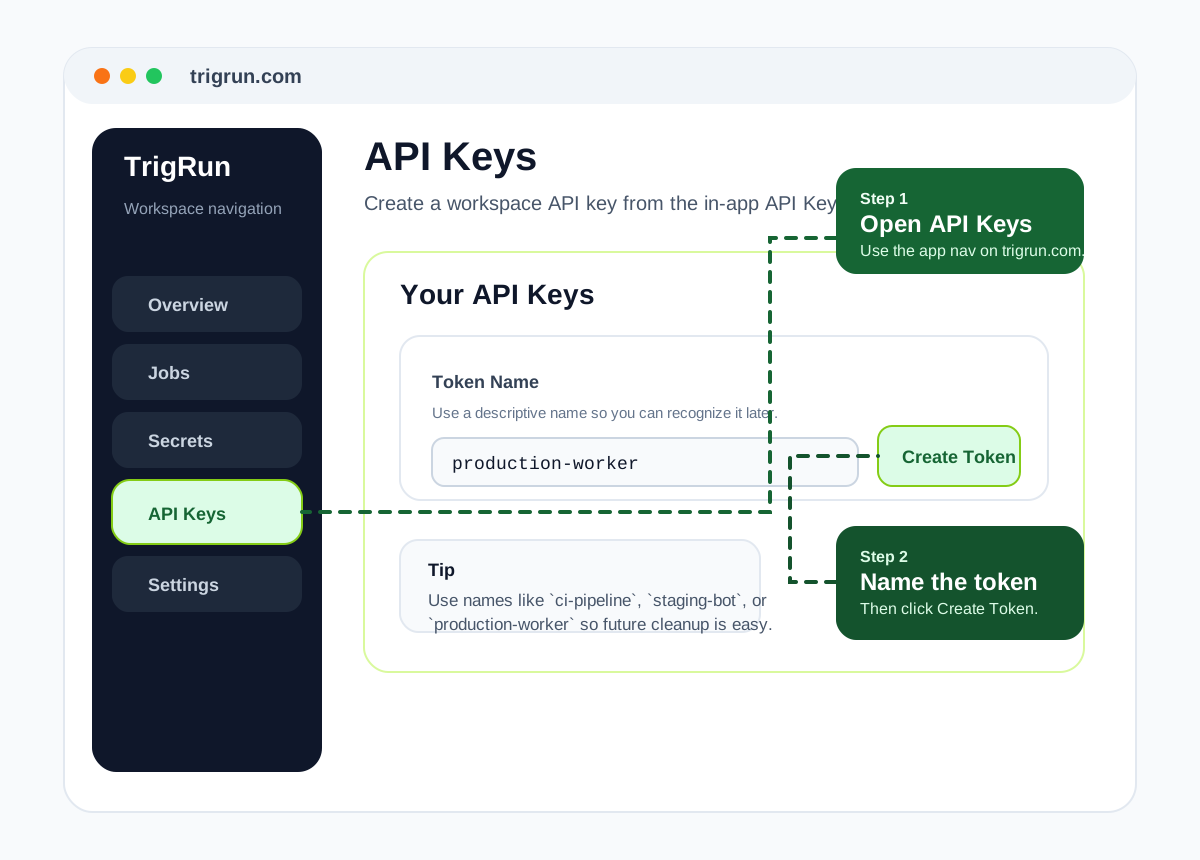
If you're using the TrigRun app, the easiest way to create a token is:
- Sign in at trigrun.com.
- Open API Keys in the app navigation.
- Enter a descriptive token name such as
ci-pipelineorproduction-worker. - Click Create Token.
- Copy the raw token immediately and store it in your password manager, secret manager, or CI environment.
Copy it before leaving the page
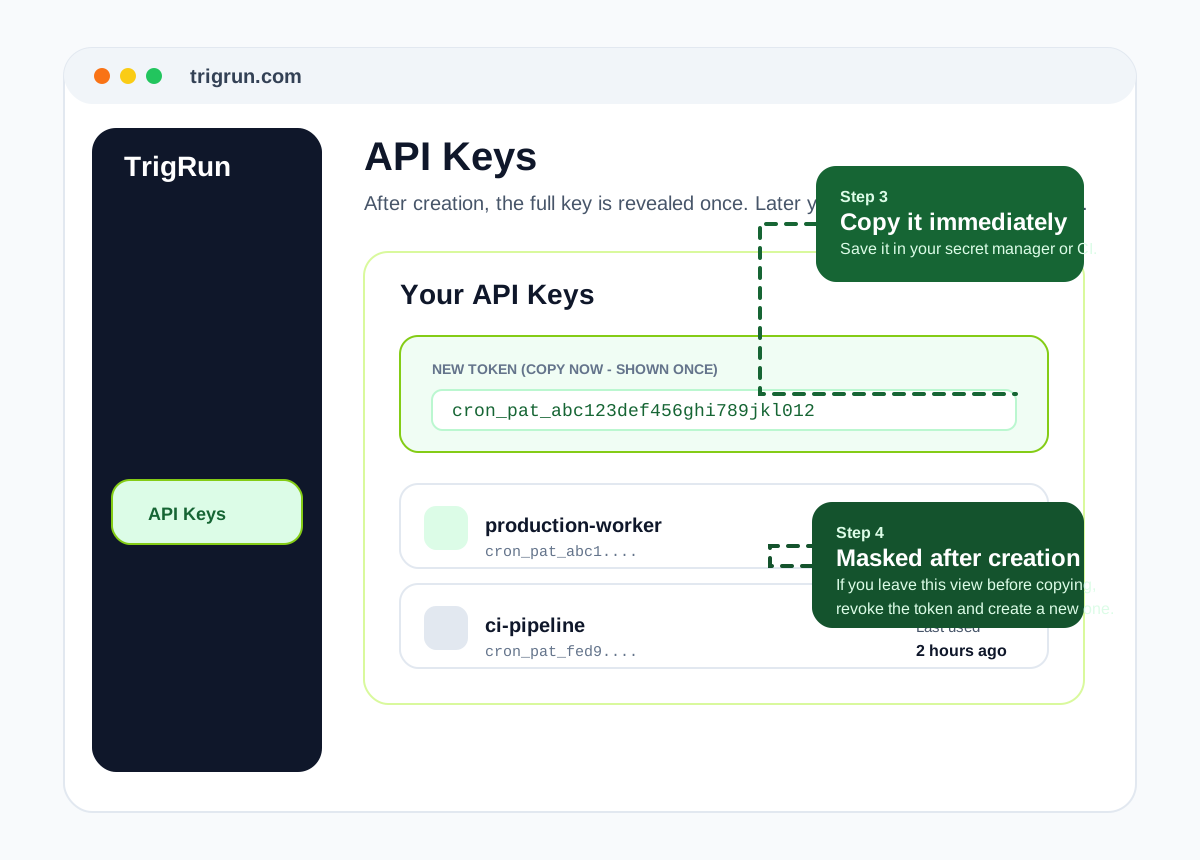
TrigRun only shows the full token value once, right after creation. After that, the UI only shows the masked value, so if you close the screen before copying it, you'll need to revoke it and create a new one.
Create a token (owner only):
The raw token value is returned only once at creation time. Store it securely.
Revoke a token (owner only):
Permission matrix
| Operation | Owner | Admin | Member | API Token |
|---|---|---|---|---|
| View jobs, executions, secrets | Yes | Yes | Yes | Yes |
| Create/update/delete jobs | Yes | Yes | No | Yes (inherits creator role) |
| Create/delete secrets | Yes | Yes | No | Yes (inherits creator role) |
| Manage notification channels | Yes | Yes | No | Yes (inherits creator role) |
| Create/revoke API tokens | Yes | No | No | No |
| Manage team members | Yes | No | No | No |
| Update billing/plan | Yes | No | No | No |
| Update workspace settings | Yes | No | No | No |
| Transfer ownership | Yes | No | No | No |
API tokens inherit the permissions of the user who created them, so they can perform the same actions that user could perform at the time the token was created.
Workspace restriction
If a workspace is restricted (e.g., for a billing or TOS issue), all write operations are blocked but read access remains available. The restriction reason is included in the workspace object:
CLI authentication
The trigrun CLI stores credentials in ~/.trigrun/config.json:
If you want token-based CLI auth for CI, bots, or non-interactive scripts, create a workspace API token in API Keys and then either save it to the CLI config:
You can also set credentials via environment variables:
Environment variables take precedence over the config file.
Error responses
| Code | Error | When |
|---|---|---|
| 401 | unauthorized | Missing or invalid token |
| 401 | invalid_credentials | Wrong email or password |
| 401 | token_orphaned | API token's creator was deleted |
| 401 | token_creator_removed | API token's creator left the workspace |
| 403 | email_not_verified | Write action before email verification |
| 403 | insufficient_role | Action requires a higher role |
| 403 | workspace_restricted | Workspace is restricted |
| 403 | account_restricted | User account is restricted |
| 429 | rate_limited | Too many requests (includes Retry-After header) |